

Showit
the ultimate guide to
Wondering if Showit is right for you? What the switch would be like from your current platform? Here are all the deets.
It's a website builder & website host.
Showit is a website hosting platform and website builder (like Squarespace or Wix — but better).
The user interface is AMAZING.
Showit understands savvy business people, like yourself. They know what you want your website to look like, and what you care about for user interface while you edit everything.
Unique Capabilities
With Showit, you can showcase your brand’s personality in a unique and creative way that you simply can’t with other website builders.

Showit is the best of the best when it comes to website builders. Click below to sign up for Showit and get 30 days absolutely FREE. (Or, use the referral code "ELIZABETH" when you sign up!)
GET A FREE MONTH
Get a free month of your Showit subscription with my Showit discount link!
What makes Showit unique
- You don’t have to use HTML, CSS, Java or ANY code. EVER.
- You get amazing support right at your fingertips from real humans.
- You can actually customize everything you see.
- Most website builders don’t actually give you control over what the mobile website looks like. With Showit, you can customize the mobile website to be unique from the desktop version.
- Showit integrates with WordPress for blogging, so you can have power and flexibility of WordPress with the design freedom of Showit.
- Many website builders have standardized functionality, so you can definitely tell what it was built on. Showit let’s you make a site that’s totally unique to you.

Differences & Similarities to Squarespace
Are you currently on Squarespace?
Here's what you need to know about Showit versus Squarespace ...
✔ Both have plenty of templates to choose from
✔ Both are website builders that host your website too
✔ Both have in house customer support
In Showit, you can “drag and drop.” And honestly, I don’t even know if “drag and drop” is the best term here! Because you aren’t dragging stuff into a super stringent template where stuff has to go. You can literally do whatever you want. There is so much creative freedom. Squarespace is fairly easy to edit, but you cannot actually customize everything.
On Showit, you can customize your mobile website separately from your desktop website. All the items are still the same, but you can make both totally unique for that specific need. With Squarespace, things can look wonky on mobile, because you can only customize your desktop site. With over 63% of people regularly using phones to access your website, mobile is more important than ever!
Read the full blog post & listen to my podcast episode comparing these 2 platforms!
TAKE ME TO THE BLOG!
Showit integrates with WordPress for blogging, so you can have the power and flexibility of WordPress with the design freedom of Showit. By blogging with WordPress, you open the doors to unlimited optimization potential, SEO capabilities, and more.
Squarespace is COMPLETELY template-based, which is different than BUYING a template. For example, if you buy a template from me and customize it, you can literally change anything. But, with Squarespace, the changes you make HAVE TO fit into the template. This makes editing more challenging and everything less “custom”.
The way SEO is done on Squarespace is hard to figure out and not very intuitive, so people often skip it. With Showit, you can do on-page SEO for every page of your website. My clients and template buyers report getting found more frequently on search engines after making the switch. And, in the training course that comes with your template, I teach you everything you need to know about SEO!
Squarespace has more e-commerce capabilities built right into the platform than Showit. However, Showit can integrate e-commerce with ease. Even though Squarespace does e-commerce, if you have an actual e-commerce website (where that’s what you’re doing, you’re selling e-commerce) then I’d pick Shopify. Or, you can do an integration (via Showit) with companies like Kajabi, ThriveCart, Thinkific, or Shopify Lite!
— Gretchen Saffles, Well-Watered Women
“We have been working with Squarespace for several years now and came to a point where the Sqaurespace design was too limited for what we needed. We have loved working with the new platform! Showit has been able to expand our hosting and designing options and offer us what we need!”
— Katy, The Tidy Cottage
“I love Showit! I am excited to feel more in control of the website and my blog as well. Everything seems more logical and the platform seems easier to use."
— Shanella, Life Coach
“Getting to 'customize' everything exactly how I preferred in Showit was so fun! I love the Showit platform and it is going to be so easy going forward customize my website as I grow and expand in my business!"

Differences & Similarities to WordPress
Are you currently on WordPress?
Here's what you need to know about Showit versus WordPress ...
✔ WordPress is crazy powerful and quite limitless with the number of plugins out there that you can add to your website.
✔ While WordPress has many plugins and functions, its power comes at a major time, maintenance, and learning cost. Because of this, I don’t think it’s the right move for most small businesses. But, Showit combined with WordPress is a match made in website heaven!
This is the biggest reason why I don’t recommend WordPress for most people. It’s not easy to use. It’s techy and if you’re someone who flips out over tech problems, then it won’t be for you. There’s a STEEP learning curve to figuring out WordPress, plus a lot of maintenance on your end. With Showit, you don’t need coding knowledge whatsoever. And, it's extremely easy to use!
With my Showit templates, you can edit anything you see. Yes, ANYTHING. You can change the fonts, colors, the images, the entire layout in just clicks.This is not true of WordPress templates. Sure, you can change the fonts, colors, words, and images, but beyond that, you are generally STUCK to the template’s design.
Read the full blog post & listen to my podcast episode comparing these 2 platforms!
TAKE ME TO THE BLOG!
With Showit, you have a mobile view and a desktop view that you can edit inside the website builder. It’s INCREDIBLE! I love this feature because sometimes there’s something you want on the desktop version but you don’t want on mobile or vice versa. All the items are still the same, but you can make both totally unique for that specific need.
Showit hosts your website for you. So, your website fees end up being for your domain name and then what you pay to Showit. Plus, the one time cost of your template. With WordPress, you’ll have to secure your own hosting through an outside company. Choosing the outside company can feel hard and complicated, and it’s just one more techy thing you have to do to get your website up and running.
Although there are plenty of people helping other people with WordPress, WordPress itself doesn’t have customer support. If something is messed up or your site gets hacked, it’s up to you to fix it on your own. I have been there fixing it on my own crashed website, and it’s not fun! With Showit, if something goes wrong or you have a question, you can chat with a real person immediately right there in your account.
If you use Showit and choose to have a blog, you will write your blogs on WordPress. This might seem strange, but I promise, it's AMAZING. WordPress has the absolute best SEO capabilities of any website platform, and their blogging capabilities are simply second to none. So, it's a win, win. The problems with WordPress are gone when you combine it with everything Showit has to offer!
Differences & Similarities to Wix
Are you currently on Wix?
Here's what you need to know about Showit versus Wix ...
Like Showit and Sqaurespace, Wix hosts your website for you and has a number of templates to choose from as you get started. But, #REALTALK: I really dislike Wix, and I’d recommend any of these platforms we are talking about before I'd recommend Wix.
In Showit, you can “drag and drop.” And honestly, I don’t even know if “drag and drop” is the best term here! Because you aren’t dragging stuff into a super stringent template where stuff has to go. While Wix also advertises itself as “easy to use” and affordable — from my own experience and the experience of my clients, Showit is an even easier platform when it comes to designing your website.
Wix does let you do SEO on your site by answering a couple of questions and then they “do SEO for you.” However, it’s not very high quality. With Showit, you can do on-page SEO for every page of your website. In the training course that comes with your template purchase with EM Shop, you'll learn everything you need to know to rank in search results with Showit!
Read the full blog post & listen to my podcast episode comparing these 2 platforms!
TAKE ME TO THE BLOG!
Both platforms have blogging capabilities. But, Showit integrates with WordPress for blogging, so you can have the power and flexibility of WordPress with the design freedom of Showit. By blogging with WordPress, you open the doors to unlimited optimization potential, SEO capabilities, and more.
Wix has e-commerce capabilities built right in the platform, and Showit doesn’t. However, Showit can integrate e-commerce with ease. You might be thinking I’ll count this as a win for Wix, but I don’t. Even though Wix does e-commerce, if you have an actual e-commerce business, then I wouldn't pick Wix. With Showit, you can have a shop through an integration via Kajabi, ThriveCart, Thinkific, or Shopify Lite (and others)!
Wix is actually less money or the same price as Showit depending on what tier you get of Wix. So, Wix does win on price, which is often why I see people using it. You shouldn’t pick something like your website host/builder just based on price, friend. You should choose for the longevity of your business. Also, Wix’s VIP level is the exact same price as Showit’s highest price.
With Showit, if something goes wrong or you have a question, you can chat with a real person immediately right there in your account. Showit also has “emergency” support for if something happens to your site to get you an even faster response time. Plus, you have ME as support. Wix also has customer support, but they are less available and less effective than Showit in my experience.
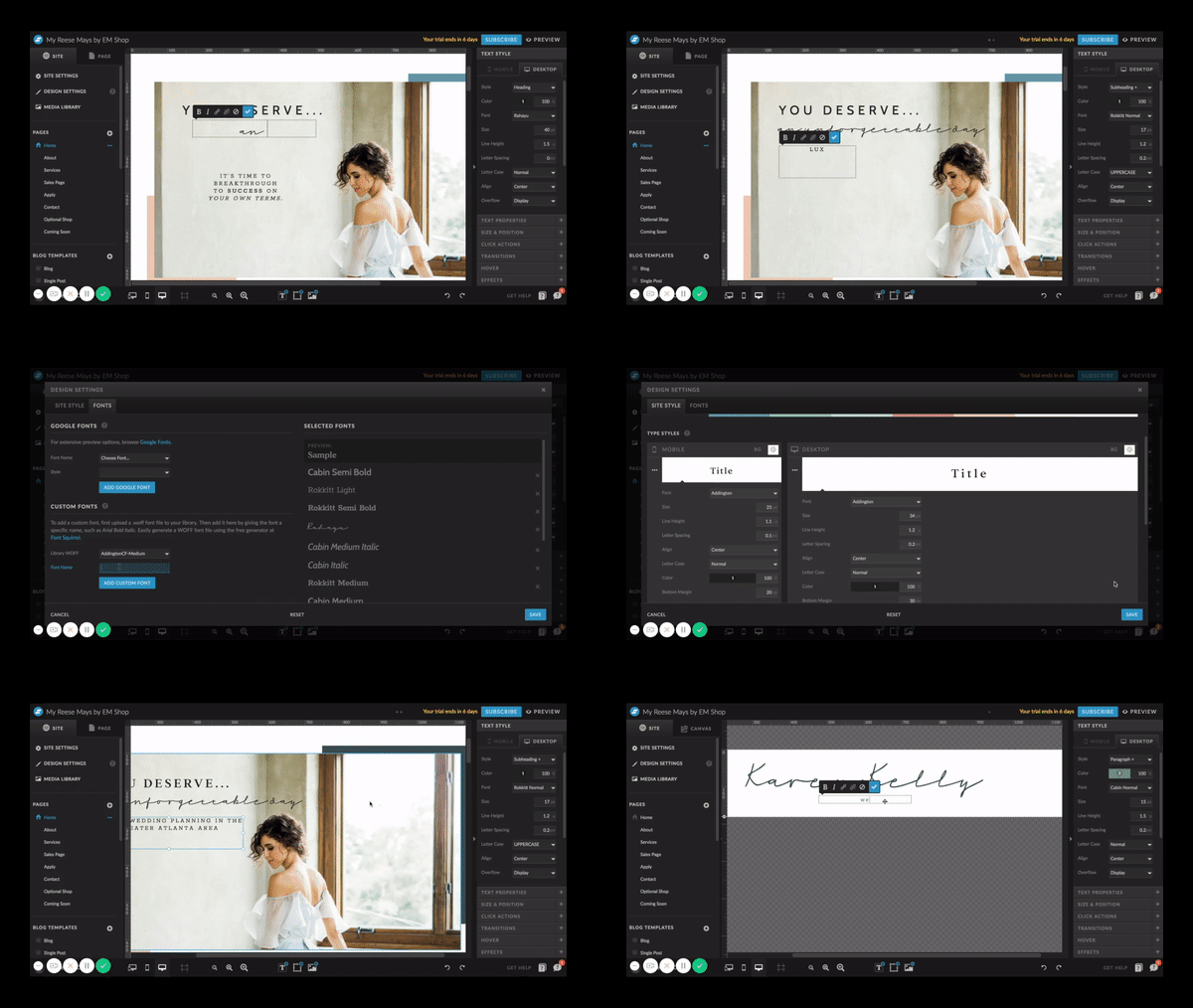
And look how simple it is to make changes on Showit! Is your current website this easy to edit?
When we say you can customize everything… we mean everything.
I HAVE 3 PODCAST EPISODES/BLOG POSTS ON THIS EXACT TOPIC.
Wondering what it's like to switch to Showit from Squarespace, WordPress, Wix, etc.?

learn more about showit versus squarespace
get the blog & podcast!

learn more about showit versus wix
get the blog & podcast!

learn more about showit versus wordpress
get the blog & podcast!
what do I need to
You need a website template!
Shop EM Shop templates here. They're easy to use, super strategic, and personality-packed.
1
You need a Showit subscription.
This will come AFTER you purchase your template. Get a free month of Showit here. Any hosting fees you’re paying to Squarespace, Wix, Bluehost, HostGator, or GoDaddy will be eliminated.
2
You need a domain name.
This is your website’s URL. If you already have a website, then you probably already have this.
3
shop showit
Website Templates
Shop pre-made, customizable Showit website templates. They are easy to use, strategically-designed, and created to help you book more clients FAST.
omg, I'm so in.